Новичкам
Disconnected: EAC: Anti-cheat client protection not active (NullClient)

Ошибка которая выводится при запуске на сервер Disconnected: EAC: Anti-cheat client protection not active (NullClient) Бесит, правда?
Что происходит?
Ваш античит EasyAntiCheat EOS (Epic Online Services) находится в состянии dummy дебагера или вовсе не загружается в должном порядке
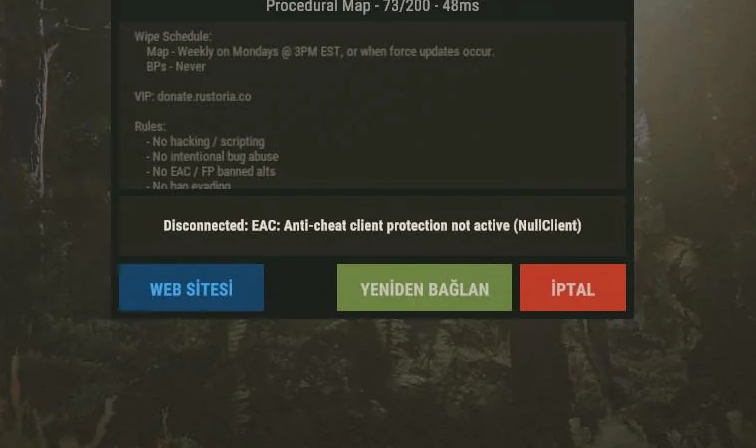
EasyAntiCheat EOS
Переходим по пути:
Перед нами папка или даже папки названные закорючкми 429c2212ad284866aee071454c2125b5, или любое другое ваше название
и файл service.log
В нем последние 5 строчке должны вглядеть следующим образом сразу после запукска игры (время запуска соотвествующее HH:MM:SS:Ms):
Если у вас не так - закрывайте статью.
Если у вас много папок далее с разными названиями, удаляем все, запускам игру, появится нужная Вам.
По пути:
Файл anticheatlauncher.log будет у всех
Файлы easyanticheat_x64.eac easyanticheat_x64.eac.metadata будут у здоровых людей. Если после удаления этой папки и перезапуска игры они у вас есть - закрывайте статью. Вы напутали запросом, прочитайте шапку.
В файле вы увидете следующую запись
Деплоинг античита прошел успешно в версии
C:\Users\ User \AppData\Roaming\EasyAntiCheat%appdata% \Roaming\EasyAntiCheat Перед нами папка или даже папки названные закорючкми 429c2212ad284866aee071454c2125b5, или любое другое ваше название
и файл service.log
В нем последние 5 строчке должны вглядеть следующим образом сразу после запукска игры (время запуска соотвествующее HH:MM:SS:Ms):
[EAC Setup] [8380] [19:43:15:292] [Info] Process started, running as admin: true.
[EAC Setup] [8380] [19:43:15:292] [Info] Started with 'install 429c2212ad284866aee071454c2125b5'.
[EAC Setup] [8380] [19:43:15:293] [Info] Argument handling done, requested action: 1.
[EAC Setup] [8380] [19:43:15:309] [Info] ProductId already marked as installed, no action needed.
[EAC Setup] [8380] [19:43:15:313] [Info] Operation 1 completed successfully.
Если у вас не так - закрывайте статью.
Если у вас много папок далее с разными названиями, удаляем все, запускам игру, появится нужная Вам.
По пути:
\Roaming\EasyAntiCheat\429c2212ad284866aee071454c2125b5\76796531e86443548754600511f42e9e \Roaming\EasyAntiCheat\*ProductId*/*DeploymentId*Файл anticheatlauncher.log будет у всех
Файлы easyanticheat_x64.eac easyanticheat_x64.eac.metadata будут у здоровых людей. Если после удаления этой папки и перезапуска игры они у вас есть - закрывайте статью. Вы напутали запросом, прочитайте шапку.
В файле вы увидете следующую запись
[19:30:09:149] [Windows] [EAC Bootstrapper] [Info] Loaded the following settings .json file: 'H:\SteamLibrary\steamapps\common\Rust\EasyAntiCheat\Settings.json'
[19:30:09:149] [Windows] [EAC Bootstrapper] [Info] Provided settings:
[19:30:09:149] [Windows] [EAC Bootstrapper] [Info]  - ProcessTitle: Rust.
[19:30:09:149] [Windows] [EAC Bootstrapper] [Info]  - ExecutablePath: RustClient.exe.
[19:30:09:149] [Windows] [EAC Bootstrapper] [Info]  - ProductId: 429c2212ad284866aee071454c2125b5.
[19:30:09:149] [Windows] [EAC Bootstrapper] [Info]  - SandboxId: ec47bae0651a4765a063c1e83ec41b34.
[19:30:09:149] [Windows] [EAC Bootstrapper] [Info]  - DeploymentId: 76796531e86443548754600511f42e9e.
[19:30:09:149] [Windows] [EAC Bootstrapper] [Info]  - RequestedSplashScreen: EasyAntiCheat/SplashScreen.png.
[19:30:09:149] [Windows] [EAC Bootstrapper] [Info]  - WaitForGameProcessExit: false.
[19:30:09:149] [Windows] [EAC Bootstrapper] [Info]  - HideGUI: false.
[19:30:09:149] [Windows] [EAC Bootstrapper] [Info]  - HideBootstrapper: false.
[19:30:09:283] [Windows] [EAC Bootstrapper] [Info] Embedded resources successfully loaded.
[19:30:09:286] [Windows] [EAC Bootstrapper] [Info] Will use the icon extracted from the game executable.
[19:30:09:338] [Windows] [EAC Bootstrapper] [Info] System name: 'win64'.
[19:30:09:338] [Windows] [EAC Bootstrapper] [Info] Loader initializing with bootstrapper version 1.9.0, architecture: x86-64.
[19:30:09:339] [Windows] [EAC Bootstrapper] [Info] Debug environment variable (EOS_USE_ANTICHEATCLIENTNULL) was present, launching with null client. To use the live module, remove the environment variable.
[19:30:09:339] [Windows] [EAC Bootstrapper] [Info] Launching with null client due to an explicit request.
[19:30:09:347] [Windows] [EAC Bootstrapper] [Info] Launcher finished with: 301, 'Easy Anti-Cheat successfully loaded in-game'.
[19:30:09:347] [Windows] [EAC Bootstrapper] [Info] Successfully initialized the Easy Anti-Cheat module, waiting for game window to become visible.
[19:30:09:347] [Windows] [EAC Bootstrapper] [Info] Unlocking the launch lock, allowing next game to launch to take place.
[19:30:10:490] [Windows] [EAC Bootstrapper] [Info] The game window has become visible, the bootstrapper will leave the visible state.
[19:30:10:514] [Windows] [EAC Bootstrapper] [Info] Downloaded 0 bytes in 8 ms (0.00 KB/s).Деплоинг античита прошел успешно в версии
Автор комментария: ГПТ Debug environment variable (EOS_USE_ANTICHEATCLIENTNULL) launching with null client
Repare
Просим помощи, и о боже:
Переменные пользователя и Системные переменные, а именно:
Всем приятной игры!
- Прописываем sysdm.cpl в Win+R
- Вкладка Дополнительно (Advanced) → Environment Variables.
- Ищем Переменные пользователя и Системные переменные
EOS_USE_ANTICHEATCLIENTNULL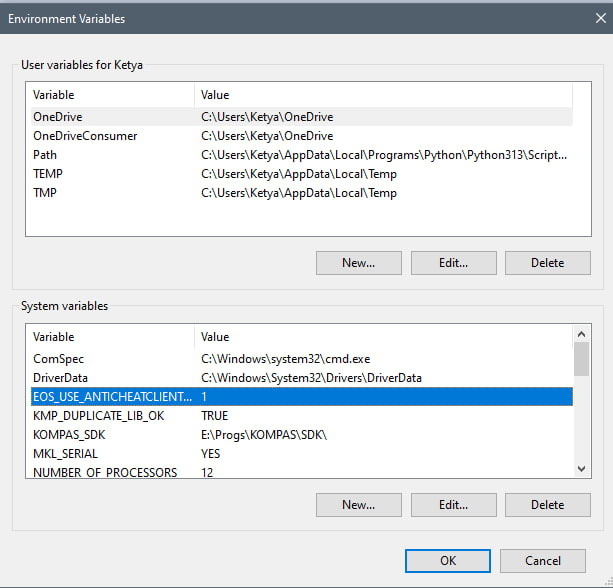
- Удаляем
- Проверяем, что удалили, несколько раз
- Переходим вновь по пути:
\Roaming\EasyAntiCheat\*ProductId*/*DeploymentId* - Открываем игру
- Открываем файл anticheatlauncher.log
- Будет прописано:
21000 строчек загрузки[19:49:14:866] [Windows] [EAC Bootstrapper] [Info] Loaded the following settings .json file: 'H:\SteamLibrary\steamapps\common\Rust\EasyAntiCheat\Settings.json' [19:49:14:866] [Windows] [EAC Bootstrapper] [Info] Provided settings: [19:49:14:866] [Windows] [EAC Bootstrapper] [Info] - ProcessTitle: Rust. [19:49:14:866] [Windows] [EAC Bootstrapper] [Info] - ExecutablePath: RustClient.exe. [19:49:14:866] [Windows] [EAC Bootstrapper] [Info] - ProductId: 429c2212ad284866aee071454c2125b5. [19:49:14:866] [Windows] [EAC Bootstrapper] [Info] - SandboxId: ec47bae0651a4765a063c1e83ec41b34. [19:49:14:866] [Windows] [EAC Bootstrapper] [Info] - DeploymentId: 76796531e86443548754600511f42e9e. [19:49:14:866] [Windows] [EAC Bootstrapper] [Info] - RequestedSplashScreen: EasyAntiCheat/SplashScreen.png. [19:49:14:866] [Windows] [EAC Bootstrapper] [Info] - WaitForGameProcessExit: false. [19:49:14:866] [Windows] [EAC Bootstrapper] [Info] - HideGUI: false. [19:49:14:866] [Windows] [EAC Bootstrapper] [Info] - HideBootstrapper: false. [19:49:14:977] [Windows] [EAC Bootstrapper] [Info] Embedded resources successfully loaded. [19:49:14:980] [Windows] [EAC Bootstrapper] [Info] Will use the icon extracted from the game executable. [19:49:15:022] [Windows] [EAC Bootstrapper] [Info] System name: 'win64'. [19:49:15:022] [Windows] [EAC Bootstrapper] [Info] Loader initializing with bootstrapper version 1.9.0, architecture: x86-64. [19:49:15:084] [Windows] [EAC Bootstrapper] [Info] Loader component initialized. [19:49:15:089] [Windows] [EAC Bootstrapper] [Info] [Connection] Connecting to URL: https://modules-cdn.eac-prod.on.epicgames.com/modules/429c2212ad284866aee071454c2125b5/76796531e86443548754600511f42e9e/win64 [19:49:15:092] [Windows] [EAC Bootstrapper] [Info] Current progress: 0 (0/0).[19:49:15:260] [Windows] [EAC Bootstrapper] [Info] Current progress: 0 (0/0). [19:49:15:260] [Windows] [EAC Bootstrapper] [Info] [Connection] Connect result: No error (0) Response Code: 304 Destination IP: 18.165.140.125 [19:49:15:260] [Windows] [EAC Bootstrapper] [Info] No update needed. [19:49:15:260] [Windows] [EAC Bootstrapper] [Info] Current progress: 100 (1/1). [19:49:26:974] [Windows] [EAC Bootstrapper] [Info] Launcher finished with: 301, 'Easy Anti-Cheat successfully loaded in-game'. [19:49:26:974] [Windows] [EAC Bootstrapper] [Info] Successfully initialized the Easy Anti-Cheat module, waiting for game window to become visible. [19:49:26:974] [Windows] [EAC Bootstrapper] [Info] Unlocking the launch lock, allowing next game to launch to take place. [19:49:32:453] [Windows] [EAC Bootstrapper] [Info] The game window has become visible, the bootstrapper will leave the visible state. [19:49:32:475] [Windows] [EAC Bootstrapper] [Info] Downloaded 1 bytes in 239 ms (0.00 KB/s). - У вас должны появится долгожданные 2 файла easyanticheat_x64.eac и easyanticheat_x64.eac.metadata
- Удостоверьтесь, что у вас не прописаны доп. параметры к запуску игры, стима, или игры в стиме
Переменные пользователя и Системные переменные, а именно:
EOS_USE_ANTICHEATCLIENTNULLВсем приятной игры!
Ваше Спасибо
Автор комментария: Ketya Я буду рад что помог кому-то разобраться с техническими неадекватной ошибкой!Как вы нашли этот гайд или какими бы вы ещё словами описали найденное здесь решение?Буду рад вашим комментарием, и работе над ошибками!
На перебор информации ушло почти 6 часов, так что я буду рад вкусняшкам
Комментарии 0
Войди через Discord, чтобы комментировать